
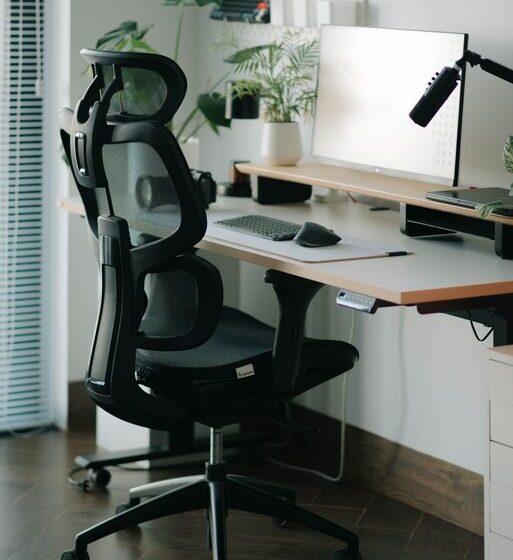

A comfortable desk chair can make your workspace more enjoyable and help you stay focused throughout the day. Whether you work from home, study, or spend several hours at a computer, the right chair should support your body, fit your desk, and adjust to your preferred sitting position.
With so many styles and features available, choosing a chair can feel overwhelming. The best option is not always the most expensive one. It is the chair that fits your body, work habits, and space. Use the tips below to compare your options with confidence.
Start With the Right Fit
Comfort begins with the basic size and shape of the chair. A chair that is too large may not provide enough support, while one that is too small can feel restrictive.
When testing a chair, check these points:
– Your feet should rest comfortably on the floor or on a footrest.
– Your knees should be positioned comfortably, without pressure from the front edge of the seat.
– The seat should support most of your thighs while allowing you to move freely.
– Your lower back should meet the chair’s backrest.
– Your shoulders should stay relaxed when your arms rest on the desk or armrests.
A good fit allows you to sit naturally without constantly shifting to find support. If possible, test a chair for several minutes before buying it. A quick test can reveal obvious problems, but a longer trial gives you a better sense of how the chair feels during normal work.
Look for Useful Adjustments
Adjustability is one of the most important features of a desk chair. People have different heights, proportions, and work styles, so a fixed chair may not suit everyone.
Seat Height
A height-adjustable seat lets you position your body properly in relation to your desk. When seated, your feet should be supported and your knees should remain comfortable. Your arms should also reach the keyboard without forcing your shoulders upward.
If your desk is unusually high or low, a chair with a wide height range can be especially useful.
Seat Depth
Seat depth describes the distance from the front of the seat to the backrest. If the seat is too deep, you may have to lean forward to reach the backrest. If it is too shallow, your thighs may not receive enough support.
Choose a seat that lets you sit back comfortably while leaving a small amount of space between the front edge and the backs of your knees.
Backrest Tilt
A backrest that tilts can make it easier to change positions during the day. Look for a chair that allows you to sit upright while also offering a slight recline when reading, thinking, or taking a break.
A locking mechanism can be helpful if you prefer a fixed position. Other users may prefer a backrest that moves freely and supports different postures.
Armrests
Armrests can reduce the need to hold your arms in the air, but only if they are positioned correctly. Adjustable armrests are usually more versatile than fixed ones.
They should allow your elbows to rest comfortably without pushing your shoulders upward. They should also fit under or around your desk if you want to move close to your work surface. If the armrests interfere with your desk, they may be more frustrating than helpful.
Check the Back Support
A desk chair should support your back without forcing you into an uncomfortable position. Look for a backrest that follows the general shape of your back and provides steady support as you sit.
Some chairs include adjustable lumbar support, which can be moved higher or lower. This feature is useful if you have difficulty finding a comfortable position with a fixed backrest. However, a chair does not need a large or noticeable lumbar cushion to feel supportive. The most important factor is whether the backrest feels natural and comfortable for you.
The backrest should also be tall enough to support your upper body. A medium-height back can work well for many users, while a taller design may provide more support for the shoulders and upper back.
Choose Materials Carefully
Chair materials affect comfort, durability, maintenance, and appearance.
Fabric
Fabric chairs are often soft and breathable. They can be comfortable for long periods, especially in rooms that become warm. Look for tightly woven fabric that feels durable and is easy to clean.
Mesh
Mesh backs allow air to circulate, which may help reduce heat buildup. They also provide a flexible feel and often have a modern appearance. However, mesh can vary widely in firmness and quality. Sit in the chair first if possible to ensure the material does not feel too hard or loose.
Leather and Faux Leather
Leather and faux leather are easy to wipe clean and can create a polished look. They may feel warm in some rooms and cool in others. Faux leather can be a practical lower-cost choice, but its durability depends on the quality of the material.
Cushioning
A soft seat may feel comfortable at first but can lose support over time. A firm seat is not automatically better, either. Look for balanced cushioning that supports your weight without creating pressure points. The cushion should remain comfortable after you have been sitting for several minutes.
Consider the Chair’s Base and Movement
A stable base helps a chair feel secure. Most desk chairs have a five-point base, which can provide good balance during normal movement.
Wheels are useful if you need to move between a desk, monitor, printer, or nearby storage. Make sure the wheels roll smoothly on your floor. Some chairs are designed for hard floors, while others work better on carpet. If needed, use a floor mat to protect the surface and make movement easier.
The chair should also swivel smoothly. A rotating seat lets you reach nearby items without repeatedly twisting your body or moving the entire chair.
Match the Chair to Your Desk
Even a well-designed chair may be uncomfortable if it does not work with your desk. Check the height of both pieces together before making a decision.
The chair should allow you to:
– Sit close enough to reach your keyboard and mouse.
– Keep your monitor at a comfortable viewing height.
– Place your feet securely on the floor.
– Move your legs freely beneath the desk.
– Use the armrests without hitting the desk frame.
If your desk has a fixed height, prioritize a chair with a suitable adjustment range. If the chair only works at its highest or lowest setting, it may not provide enough flexibility for everyday use.
Think About Your Daily Routine
Your work habits should guide your choice. Someone who spends most of the day typing may value adjustable armrests, steady back support, and breathable materials. Someone who frequently reads, joins video calls, or moves around the room may prefer a chair with a flexible backrest and smooth wheels.
Ask yourself:
– How many hours will I sit in the chair each day?
– Do I need to move often?
– Is the room warm or cool?
– Do I prefer a soft or firm seat?
– Will other people use the chair?
– How much space is available around the desk?
Answering these questions can help you focus on features that you will actually use.
Compare Quality and Warranty
A chair that looks attractive may not always be built for regular use. Inspect the frame, adjustment controls, stitching, base, and wheels. The controls should work smoothly without excessive looseness or resistance.
A warranty can provide useful information about the manufacturer’s confidence in the product. Check what the warranty covers and how long it lasts. Also review the return policy, especially when buying online. Comfort is personal, and the ability to return a chair can be important if it does not suit you.
Avoid Common Buying Mistakes
Before choosing a desk chair, try to avoid these common mistakes:
– Buying based only on appearance.
– Choosing the cheapest option without checking its construction.
– Assuming more features automatically mean more comfort.
– Ignoring the chair’s dimensions.
– Forgetting to measure the desk and available floor space.
– Skipping the return policy.
– Selecting a chair without considering the materials and cleaning needs.
A simple chair with a good fit may be more comfortable than a feature-heavy model that does not match your body or workspace.
Final Checklist
Before you buy, confirm that the chair:
– Fits your height and body proportions.
– Has a comfortable seat with suitable depth.
– Provides steady back support.
– Includes the adjustments you are most likely to use.
– Works well with your desk.
– Has a stable base and suitable wheels.
– Uses materials that match your room and maintenance preferences.
– Comes with a reasonable warranty or return policy.
The ideal desk chair should make it easier to maintain a relaxed, supported sitting position while giving you enough freedom to move. Take your time, test several options when possible, and focus on fit and everyday comfort rather than appearance alone.